Track Your Custom Sportswear Order On Your Phone.
Every True Fit order has a private page with photos and approvals. Add it to your home screen and your phone tells you the moment something happens — no app store, no download, no cost.
Published — True Fit Sportswear Team
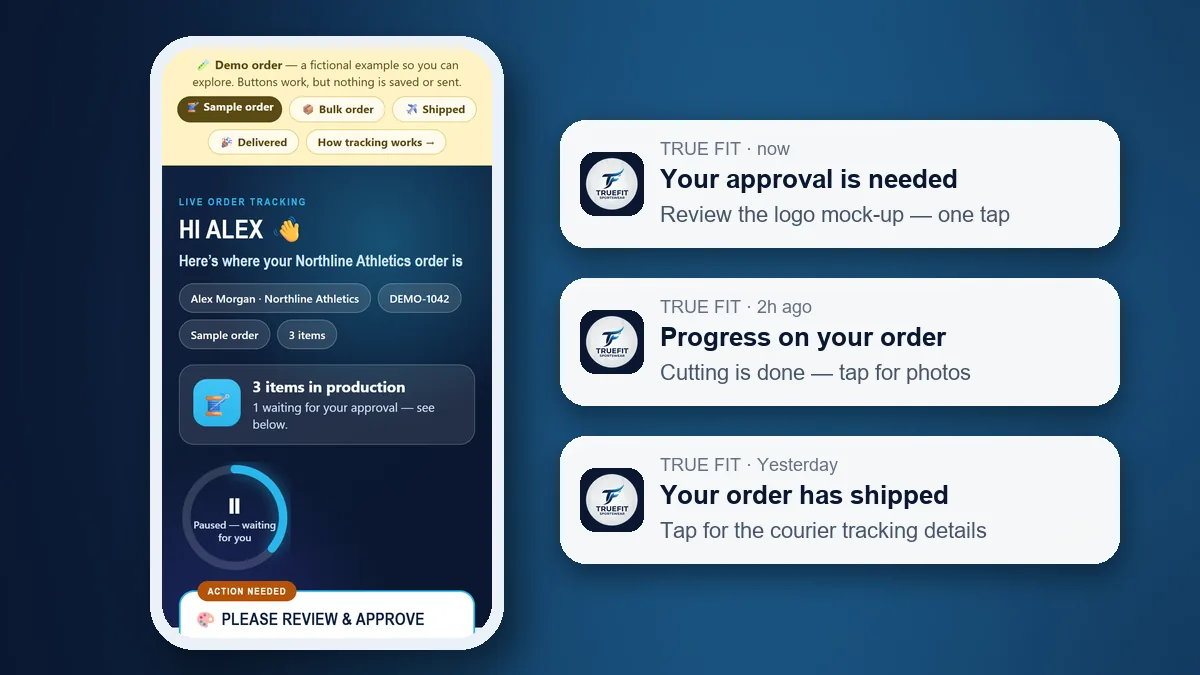
The tracking page (shown here with our fictional demo order) and the kind of notifications your phone can show.
The Short Answer
Yes — you can get your True Fit order updates as notifications on your phone, on both Android and iPhone, for free and without installing anything from an app store. You open your private tracking link, tap Turn on notifications, and optionally add the page to your home screen so it opens like an app. After that your phone tells you when your order moves forward, when we need your approval and when it ships. Email updates continue as before.
Why We Built It
Ordering custom sportswear from another country means long gaps where you wonder what is happening. We already give every order its own live tracking page with photos, a working-day countdown and approvals before cutting and printing. Notifications close the last gap: you do not have to remember to check, and an approval that is waiting for you does not sit unseen while the clock is paused.
What Your Phone Will Tell You
- Your order is activated and production has started.
- A production step is complete — with photos when we have them.
- Something needs your approval, such as a logo mock-up or label position.
- A payment is due, or a payment has been received.
- The timeline changed, for example because of a holiday or a delay on our side.
- Your parcel has shipped, and when it has been delivered.
- Our team sent you a message on the order page.
How To Set It Up On Android
- Open your private tracking link (from our email) in Chrome.
- Scroll to Get your order updates on your phone and tap Turn on notifications, then Allow.
- Optional: tap Add to home screen to get a My Order icon that opens your page like an app.
How To Set It Up On iPhone
- Open your tracking link in Safari (iOS 16.4 or newer).
- Tap the Share button, then Add to Home Screen, then Add.
- Open My Order from your home screen, tap Turn on notifications and Allow. Apple only allows web notifications from the home-screen version.
What The Tracking Page Itself Shows
The notification is only a nudge. The page it opens is where the detail lives:
- Each production step with a photo update when a step is completed, so you can compare the real garment with your brief.
- A working-day countdown for the order, which is adjusted and explained if a step has to be redone.
- Approval requests, such as a logo mock-up or label position, which you answer on the page before we cut or print.
- Pre-shipment photos and video, so you see the finished goods before they leave Sialkot.
- The courier tracking number once the parcel ships, so you can follow it to your door.
If you have several items in production, each one moves through its own steps. For a full walk-through, see how order tracking works, or open the demo order to explore it first.
Privacy And Control
Your tracking link is private and unguessable; anyone without it cannot open your order. Notifications are connected to that one order only and you can switch them off any time from the same card. We use the standard web-push system built into your phone, so there is no extra account to create and nothing is installed on your device beyond the home-screen shortcut you choose to add.
If Notifications Do Not Arrive
Most problems come from phone settings, not from the order page. Work through these in order:
- Open your tracking page and tap Turn on notifications again, then choose Allow when your phone asks.
- Check your phone’s notification settings for the browser (Android) or for the My Order home-screen icon (iPhone). Notifications must be allowed there too.
- Turn off any Do Not Disturb or Focus mode that is silencing the app, and make sure battery saver is not blocking background alerts.
- On iPhone, confirm you are on iOS 16.4 or newer and that you opened the page from the home-screen icon, not from a Safari tab.
- Still nothing? Your email updates continue as normal, and you can message us on WhatsApp and we will help.
What It Does Not Replace
Notifications are a convenience on top of what we already do: every update is still emailed, our team still answers on the order page and on WhatsApp, and approvals still happen on your tracking page before we cut or print. Our tracking covers everything we control, from payment to the moment the courier collects your parcel; after that the courier’s own tracking number takes over. For how long each stage takes, see how long custom sportswear production really takes, and for the checks behind the photos you receive, our quality control process and the stage-by-stage quality control checklist. If you have never ordered custom sportswear before, our samples guide shows what the first order looks like, and once an order is finished you can repeat it from the same page; see how to reorder custom sportswear.
Frequently Asked Questions
Do I need to download an app from the App Store or Google Play?
No. Your order page works in your phone browser. If you want it to behave like an app, add it to your home screen from the browser menu — there is nothing to download from an app store and it costs nothing.
What do I get notified about?
When your order is activated, when a production step is completed (with photos when we have them), when something needs your approval such as a logo mock-up, when a payment is due or received, if the timeline changes, when your parcel ships, when it is delivered, and when our team sends you a message on the order page.
Does it work on iPhone?
Yes, on iOS 16.4 or newer. Open your tracking link in Safari, tap Share, then Add to Home Screen, then open My Order from the new home-screen icon and tap Turn on notifications. Apple only allows web notifications from a web app added to the home screen.
Is it private? Can someone else see my order?
Your notifications are tied to your own private tracking link and to one order only. Nobody can see your order without that link, and you can turn notifications off at any time from the same page.
Will I still get emails?
Yes. Every update is still emailed to you, with photos; phone notifications are an extra, faster way to hear about it. You choose which you prefer.
I lost my tracking link. How do I get notifications?
Open truefitsportswear.com/track and enter your invoice number and the email address on the order, or message us on WhatsApp and we will resend your private link. Then turn notifications on from that page.
Can I follow more than one order?
Yes. Each order has its own private page and its own notifications, so you can connect your phone to as many of your orders as you like.
New here? See how a zero-MOQ sample works, browse the product range or read about private label production.